Showing posts with label Office tools. Show all posts
DATARECOVERY


View PDF files from your computer in a quick, effortless manner by relying on this lightweight application that comes with basic functions

If your work implies handling various text documents on your computer, you probably understand the importance of trustworthy software assistance.

Nowadays, there is a great variety of tools that can prove to be helpful in the situation described above. One of them is VeryPDF Reader.

Please note that this application requires you to have Java Runtime Environment on your computer so it can run as intended.

Minimalistic user interface

Since it is a portable application, it does not require you to install it on your computer, as decompressing the archive file and running the executable is enough to access its functions. More over, it does not modify your Windows' registry entries nor does it create additional files or folders on your computer.

Thanks to its user-friendly interface and the straightforwardness of its functions, this application proves to be highly accessible for a wide range of users, irrespective of their PC skills.

Easily opens PDFs

VeryPDF Reader enables you to view PDF files on your computer in a quick, effortless manner. Doing so is possible by either using the dedicated button or by dragging the desired document and dropping it over the main window, as this application features drag and drop support. More so, you can open a URL by clicking the dedicated option under the File menu.

Among its functions, it is possible that you can find a text highlighter and an annotation manager that can help you organize the contents of your PDFs in an intuitive manner.

Exports PDFs to TXT files

Additionally, you can export the contents of your PDFs to text documents on your computer, in case you need to edit them.

To wrap it up, VeryPDF Reader is a lightweight application that can help you open PDF files from your computer in a simple manner. Its user-friendly interface and easy-to-understand functions add to its accessibility, thus making it highly intuitive for a large number of users.


Program Information
 Developer: verypdf.com Inc
Price and Added Date
FREEWARE.19-01-2016
Download Links
.
DATARECOVERY


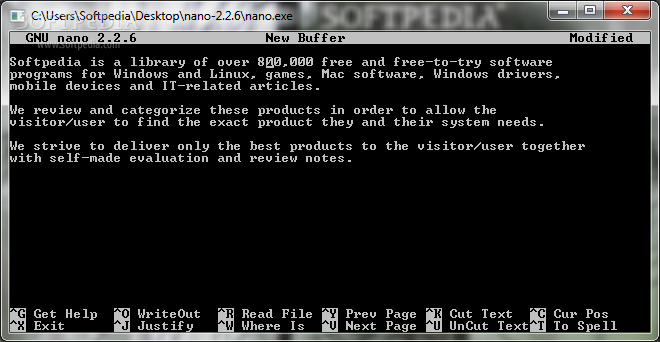
A simple text editor resembling a command prompt layout, as well as different functions to read and write under various file formats

Text editors are amongst the first living proof that convinced everyone a computer holds a lot of potential. Nowadays, these can be found to suit any need, come in different styles, with free or paid licenses. Amongst the basic types, Nano gives you the means to write down notes or text strings of interest and save under different formats.

Can be used on the go

Probably the application's only advantage is portability. From the moment you finished downloading it, you can leave it stored on a USB Flash drive to use on the go if it tickles your fancy. With minimum impact on system resources and registries, it's sure to come in handy for quickly taking notes.

Since it's a text editor, disappointment starts to slowly make its presence noticeable through the interface that resembles an instance of command prompt. It actually is, reducing all your effort to working with the keyboard through text and corresponding commands for different functions.

Shallow features and difficult to use

All operations you can performed are enlisted at the bottom, one of which fills the screen with helpful documentation. The set is rather poor, with options to open or save files, copy, cut and paste, justify or jump to a specific line. Although mostly guided, the whole experience can take a lot of getting used to.

You can forget all about character formatting or text arrangement. There are no options in this regard, with post processing requiring you to use other tools, thus putting the whole practicality under the question mark. More frustration is created by the fixed window size that makes it difficult to view large documents, especially with no mouse support for scrolling.

A few last words

To sum it up, Nano is a simple text editor that just seems to be caught in the wrong era. It's a little more than just writing letters in a command prompt environment but it's difficult to manage for handling text, with no mouse support and ambiguous to sometimes frustrating methods of managing content. There's also no support for programming, or at least syntax highlighting, further dragging down practicality to the point of no return.


Program Information
 Developer: Nano Team
Price and Added Date
GPL.16-01-2016
Download Links
.
DATARECOVERY


A lightweight and easy to use program meant to help you make annotations on your Portable Document Format files using the mouse or a Tablet PC pen

PDF Annotator is a feature-packed software application which allows you to add annotations to your PDF files. These can be directly applied to the documents. Alternatively, you can use the mouse or a Tablet PC.

The interface of the program is professional-looking and intuitive. PDF Annotator supplies you with a wide range of shapes and colors when it comes to pens, markers and stamps, along with text and graphical tools.

It is also possible to use standard tools, such as line, arrow, rectangle, ellipse, eraser and lasso. Furthermore, you can take snapshots and save them as images or stamps, or simply copy them to the Clipboard, as well as extract text from the original documents, crop the current page or insert images.

In addition, you can access a list of favorite tools, find text, use the undo and redo functions, rotate and flip selections, melt or remove all annotations, zoom in and out, switch to full screen mode, and create auxiliary lines, among others.

The software app is customizable concerning document tabs, toolbars, the sidebar, the full screen mode, measures, the language, text and performance. Plus, you can create backups, adjust the annotation quality, integrate PDF Annotator into the Explorer context menu, access a virtual printer and select the logging level.

PDF Annotator runs on a moderate-to-high amount of CPU and system memory, has a good response time and includes user documentation. No error dialogs have been shown in our testing and the application did not hang or crash. Thanks to its intuitive layout and wide range of customization settings, PDF Annotator can be handled by users of any level of experience.


Program Information
 Developer: GRAHL software design
Price and Added Date
TRIAL .14-01-2016
Download Links
.
DATARECOVERY


Improve your writing style, correct your spelling errors and other grammatical issues with the help of this streamlined app that has a strong proofreading service behind it

If you happen to write lots of official documents, then you can surely understand the importance of proofreading. Moreover, you might also be familiar with a few online services of this sort, one of which is Grammarly.

In a few words, Grammarly is a web-based service that helps you improve the quality of your writing by identifying and correcting mistakes related to spelling, vocabulary and even sentence structure.

Precedently, you could take advantage of what Grammarly had to offer either via a web-based app or by relying on its add-ons that integrate with the most common browsers out there. Now, there is an even better way (for some users): with the help of the Grammarly Windows app, you can improve your writing directly from the desktop.

Smooth installation and quick log-in process

The app features a seamless and fully automated installation process that does not require any kind of effort on your part. Once it has completed, you are met by Grammarly's main window and the same interface as the web-app.

As expected, to be able to use Grammarly, you need to make sure that you have a valid account. From here onwards, it is business as usual and, once logged in, you can start browsing your documents from the cloud or your can add new ones with no more than a few clicks.

Correct writing mistakes with the help of this stable app

Start writing texts and you should notice how Grammarly scans everything in real time and points out mistakes, all while offering pertinent suggestions for spelling, punctuation and vocabulary errors. It also goes as far as suggesting better sentence structure, alongside the explanation for doing so.

In addition, you also get other advanced correction tools with self-explanatory names such as Speciality Checking, Plagiarism, Vocabulary Enhancement and Professional Proofreading. Considering, of course, that you choose one of the paid monthly, quarterly or annual subscription plans.

As far as workflow is concerned, worth-mentioning is the fact that you can now drag and drop the documents you need to proofread directly onto Grammarly's window.

Grammarly, out of your browser and onto your computer's desktop

All in all, Grammarly is a service that most certainly has a lot to offer for users who want an active safety net for their writing (just as long they stay away from overly-complicated phrases or expressions).

Now, with the help of its official Windows application, it provides a more stable and a more accessible working environment, without compromising any of its useful features


Program Information
 Developer: Grammarly Inc.
Price and Added Date
DEMO.14-01-2016
Download Links
.
DATARECOVERY


A simple-to-use application that packs numerous options for converting Microsoft Excel files (XLS format), with support for task scheduling

Convert XLS is a feature-rich application which facilitates the conversion of Microsoft Excel spreadsheets (XLS format) and CSVs to other items, such as CSV, TXT, HTML or XLSM, while putting emphasis on numerous configuration methods.

After a brief and uneventful setup procedure, you are greeted by a standard window with a well-organized layout, where you can get started by selecting the action to take, between file conversion and special processing.

The latter option lets you copy specific data from sheets, change cell contents, add new sheets, replace characters, remove control characters, and many more.

Loading Excel files into the workspace is done using either the file browser or folder view ("drag and drop" is not supported). Batch processing is allowed, so you can convert as many files as you want. Once you establish the output directory, you can initialize the conversion operation.

In addition, you can view log details, save the conversion job for further modifications or schedule one, as well as convert items to a fixed-width text file.

As far as conversion options go, you can convert values or include formulas as well, specify a sheet range and skip empty worksheets, input passwords if necessary, use double quotes and a custom XML format, and others.

Convert XLS is low-demanding when it comes to the CPU and system memory, thus it doesn't interfere with the runtime of other active processes. It is very responsive to commands, carries out conversion jobs rapidly, and delivers quality results. No error dialogs have been shown in our tests, and the program did not hang or crash. However, Convert XLS needs some improvements in the visual department of the GUI.


Program Information
 Developer: SoftInterface Inc
Price and Added Date
TRIAL .14-01-2016
Download Links
.
DATARECOVERY


Create and manage daily assignments, prioritize and color-code tasks, assign tags, encrypt information, schedule reminders, upload the project via FTP, and more

Keeping track of all pending tasks and upcoming events is something most employees struggle with. ToDoList is a small-sized app that helps you manage daily activities so that you can stay focused and always have a clear idea of your next assignment. It comes equipped with a lot of options and configuration settings, so you should take plenty of time to discover its full capabilities.

Simple and neatly organized interface

The installation procedure is fast and does not require special attention. The program is wrapped in a clear-cut interface with a well-structured layout. If you don't have a clue on how to get started, there's a brief tutorial that can be of service for beginners.

Customize task settings in every aspect

It is possible to create as many tasks and subtasks are necessary, and fill out information such as due date, category, tags, title, status, estimate time, color code and priority. What's more, you can schedule reminders, apply a spellchecker for the title and comments, split tasks into multiple parts, as well as add them to archives or directly send them via email.

Resort to a bunch of handy task management tools

The task list can be password-protected to prevent unauthorized users from viewing sensitive information, as well as exported to file and imported later. Moreover, you can upload the project to a website via FTP, consult a calendar, use a search function to locate a particular job from the list, as well as sort tasks by taking into account numerous criteria (e.g. completed status, percent completed, time tracking).

Evaluation and conclusion

The software application supports multiple languages, keyboard shortcuts and a lot of UI customization options. It can be asked to automatically run at every Windows startup until further notice. No errors were shown in our tests, and the utility did not hang or crash.

To sum it up, ToDoList provides users with an extensive set of features and customization options dedicated to creating and managing assignments. It's definitely worth exploring.


Program Information
 Developer: AbstractSpoon Software
Price and Added Date
FREEWARE.14-01-2016
Download Links
.
Powered by Blogger.

Enter your email address:

Delivered by FeedBurner

Popular Posts